MkDocs Common Snippets
Below are quick copy and pastes I use often to quickly document:
Headers & File Info#
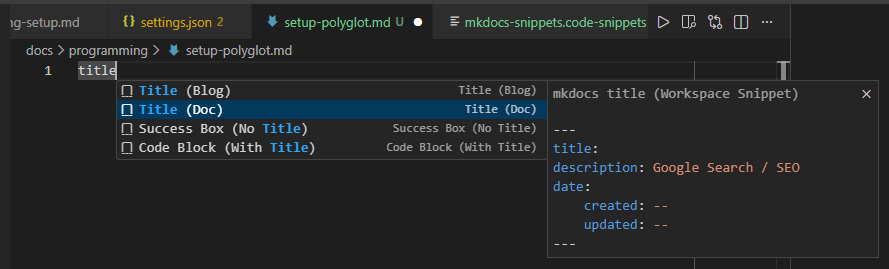
Metadata: Documentation Title#
---
title: Page name and top of tab
description: Google Search / SEO
date:
  created: 2025-11-16
  updated: 2024-11-17
---

## Section
### Sub Section
Metadata: Blog Title#
---
title: Page name and top of tab
description: Google Search / SEO
author: ComfyTechTips
date:
  created: 2025-11-16
  updated: 2025-11-17
slug: change-url-path
---

<Top of document and hook>

<!-- more -->

<Hidden>

## Section
### Sub Section
.nav.yml#
title: Lorem Ipsum # Custom title for .nav.yml root directory
hide: false # Hides .nav.yml root directory
ignore: "*.hidden.md" # Hides pattern for files matching
append_unmatched: true # Anything that isn't explicitly caught will go to end

sort:
  direction: asc
  type: natural
  by: title # some gotchas, read documentation
  sections: last
  ignore_case: true

nav:
  - one-i-want-first.md
  - "*" # the remaining files before directories and sections
  - Custom Title: Directory
  - Custom Title: File.md
  - i_want_to_flatten/a_sub/directory
  - Directory:
    - "*"
    - Some Website: https://lukasgeiter.github.io/mkdocs-awesome-nav
In-file Tools#
Admonition: Warning#
Warning
This will appear as a warning.
Warning Code
!!! warning
    This will appear as a warning.
Admonition: Note (Collapsed and Inline End w/ Custom Name)#
My Warning
Careful, this code can be very dangerous if ran without prior caution.
Note Box Code
??? note inline end "My Warning"
    Careful, this code can be very dangerous if ran without prior caution.
Admonition: Success (No title Box)#
RESULT
Success Box Code
!!! success ""
    RESULT
Text: Emojis#
Emoji Code
:fontawesome-brands-windows:
Text: Table#
| Product | What | Link |
|---|---|---|
GET | Fetch resource | <> |
PUT | Update resource | <> |
DELETE | Delete resource | <> |
Table Code
| Product      | What                                 | Link |
| :----------- | :----------------------------------- | :--- |
| `GET`        | :material-check:     Fetch resource  | <>   |
| `PUT`        | :material-check-all: Update resource | <>   |
| `DELETE`     | :material-close:     Delete resource | <>   |
Code Block: Line Numbering + Highlight#
1 2 3 | |
Highlight Lines Code
```python linenums="1" hl_lines="2 3"
def bubble_sort(items):
    for i in range(len(items)):
        for j in range(len(items) - 1 - i):
```
Code Block: Title / Filename#
bubble_sort.py
def bubble_sort(items):
    for i in range(len(items)):
        for j in range(len(items) - 1 - i):
            if items[j] > items[j + 1]:
                items[j], items[j + 1] = items[j + 1], items[j]
Code with Title
```python title="bubble_sort.py"
def bubble_sort(items):
    for i in range(len(items)):
        for j in range(len(items) - 1 - i):
            if items[j] > items[j + 1]:
                items[j], items[j + 1] = items[j + 1], items[j]
```
Selectable Tab: Multi-OS#
Windows way:
Write-Host "Hello"
Another way to say hello world:
echo -e "Hello"
Multi-OS Code
=== "Windows"

    Windows way:

    ```powershell
    Write-Host "Hello"
    ```

=== "Ubuntu Linux"

    Another way to say hello world:

    ```bash
    echo -e "Hello"
    ```
Selectable Tab: Multi-Language#
To say hello:
print("Hello")
Another way to say hello world:
using System;

namespace HelloWorld
{
    class Program
    {
        static void Main(string[] args)
        {
            Console.WriteLine("Hello, World!");
        }
    }
}
Another way to say hello world:
(println "Hello, World!")
Multi-Language Code
=== "Python"

    To say hello:

    ```python
    print("Hello")
    ```

=== "C#"

    Another way to say hello world:

    ```csharp
    using System;

    namespace HelloWorld
    {
        class Program
        {
            static void Main(string[] args)
            {
                Console.WriteLine("Hello, World!");
            }
        }
    }
    ```

=== "Clojure"

    Another way to say hello world:

    ```clojure
    (println "Hello, World!")
    ```
Images: Centered + Caption#
Image with Caption Code
<figure>
  <img src="https://dummyimage.com/600x400/eee/aaa" width="300" />
  <figcaption>Image caption</figcaption>
</figure>
VSCode Snippet File#
Check my VSCode setup for the snippets.